
Bluetooth Pi Arduino PC etc.8 - Get APK
You'll be able to download in few seconds.
Publisher Description
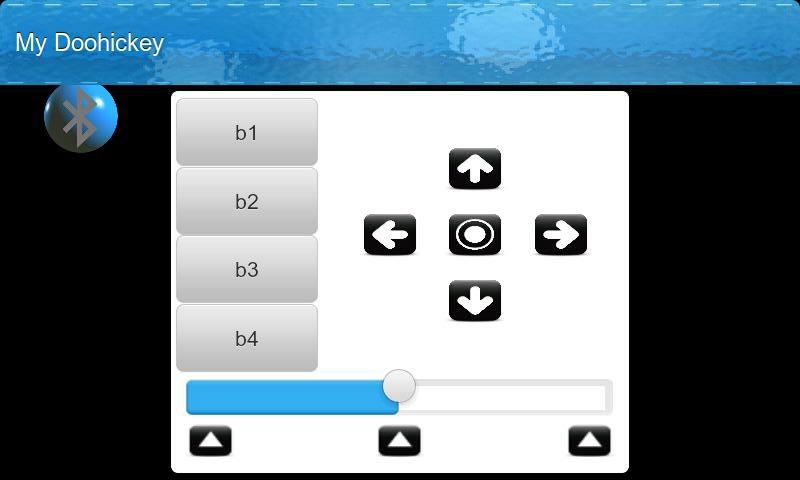
BTInterface free trial BETA
IT's FUN! Control your phone or tablet, and then to control your electronics projects with it?
Let's see, how do I convince you to install BTInterface?
Well, without controlling anything if you just install BTInterface on your phone and tell your friends the SMS password which by default is the three letter word 'bti' then they can send texts to your phone that begin with bti to make it speak, play sound effects, display things etc. :) It might be interesting to see what they come up with!
Come join my forum at
http://www.BTInterface.com
for more secrets!
BTInterface acts as the ‘buttons’ and the 'display' to your device! but it's so much more!
Now also works with PCs and Laptops! See this forum thread:
http://btinterface.com/BTInterface/forum/viewtopic.php?f=2&t=23
By using a wireless bluetooth module, dongle or built-in bluetooth you get wireless working plus a controller with great features that is simple and easy to use and to program.
Developers can sell their devices and tell the user to download BTInterface to control them!
They can also add wireless Bluetooth control to their software projects!
All the control functions including screen, sound, send/receive sms text messages etc. are already catered for so the developer can keep the cost and complexity down.
Also great for education!
Features such as send SMS Text messages? How hard would that be do you think? Well, from your micro controller device you send this text string over the bluetooth connection:
sms 01234567 this is a message from my micro controller!
Another command is 'say' and it will cause the android device to speak.
say Hello, thank you for trying bee tee interface.
BTInterface can act on incoming SMS text messages too! If they begin with the password BTInterface will take the message (it doesn't get to your normal messaging app) and act on any commands in it so in this way you can remotely control your device from any mobile phone that can send texts from anywhere in the world!
Other commands configure the screen so its just as you want it, play sound effects, hide BTInterface to the background, bring it back again, even if you put the android device in to sleep mode (screen is black) BTInterface is still working and if your micro controller sends the command:
say I'm still here you know.
it causes your android device to speak even though you thought it was turned off :)
If you load up BTInterface onto a device that has phone functions, ie: it can receive SMS Texts then you can try it out without needing any micro controller because BTInterface can work on commands that you send it in a text message!
Tremendous fun, easy to use. Try it out the beta trial is free!
About Bluetooth Pi Arduino PC etc.
The company that develops Bluetooth Pi Arduino PC etc. is Farstand Data Ltd.. The latest version released by its developer is 8.
To install Bluetooth Pi Arduino PC etc. on your Android device, just click the green Continue To App button above to start the installation process. The app is listed on our website since 2013-06-17 and was downloaded 0 times. We have already checked if the download link is safe, however for your own protection we recommend that you scan the downloaded app with your antivirus. Your antivirus may detect the Bluetooth Pi Arduino PC etc. as malware as malware if the download link to com.btinterface.trial.beta is broken.
How to install Bluetooth Pi Arduino PC etc. on your Android device:
- Click on the Continue To App button on our website. This will redirect you to Google Play.
- Once the Bluetooth Pi Arduino PC etc. is shown in the Google Play listing of your Android device, you can start its download and installation. Tap on the Install button located below the search bar and to the right of the app icon.
- A pop-up window with the permissions required by Bluetooth Pi Arduino PC etc. will be shown. Click on Accept to continue the process.
- Bluetooth Pi Arduino PC etc. will be downloaded onto your device, displaying a progress. Once the download completes, the installation will start and you'll get a notification after the installation is finished.
Program Details
System requirements
Download information
Pricing
Version History
version 8
posted on 2013-06-17
Several fixes and updates
version 8
posted on 2013-06-17
BTInterface free trial BETA,New Version 8 quicker command interface! More commands! See the Commands page in the help and the website.,www.BTInterface.com Join our forum!,More commands, better help and guidance.,Even without controlling anything just to try, install BTInterface on your phone and tell your friends the SMS password 'bti' then they can send texts to your phone to make it speak, play sound effects, display things etc.,It might be interesting to see what they come up with! :)
Disclaimer
External Download
We do not host Bluetooth Pi Arduino PC etc. on our servers. We did not scan it for viruses, adware, spyware or other type of malware. This app is hosted by Galad and passed their terms and conditions to be listed there. We recommend caution when installing it.
The APK Download link for Bluetooth Pi Arduino PC etc. is provided to you by apps112.com without any warranties, representations or guarantees of any kind, so access it at your own risk.
If you have questions regarding this particular app contact the publisher directly. For questions about the functionalities of apps112.com contact us.
